Rewards
Rewards recognise your users' accomplishments, from simple tasks like completing a training course to more complex achievements like finishing an entire learning module. When unlocked, rewards give users badges that highlight their accomplishments.
Types of rewards
There are four different types of rewards users can earn:
-
Achievements reward users for performing one or more repetitions of specific behaviours. For example, "Complete the Company Culture Course" or "Make 5 sales this week".
-
Levels reward users for reaching thresholds in one or more point categories. For example, earn 1000 experience points to unlock the "Expert" level, or accumulate 100 DevOps points to become a "DevOps Jedi".
-
Gifts allow users to recognise each other's accomplishments. This powerful motivational tool is driven by your users. Examples include "Great team player" or "Fantastic contributions".
-
Missions reward users for completing a series of other rewards. In a learning context, each course might be an achievement, while the mission comprises all these achievements. Once a user completes all relevant achievements, they unlock the mission. Missions can also be composed of other missions, allowing for complex reward structures.
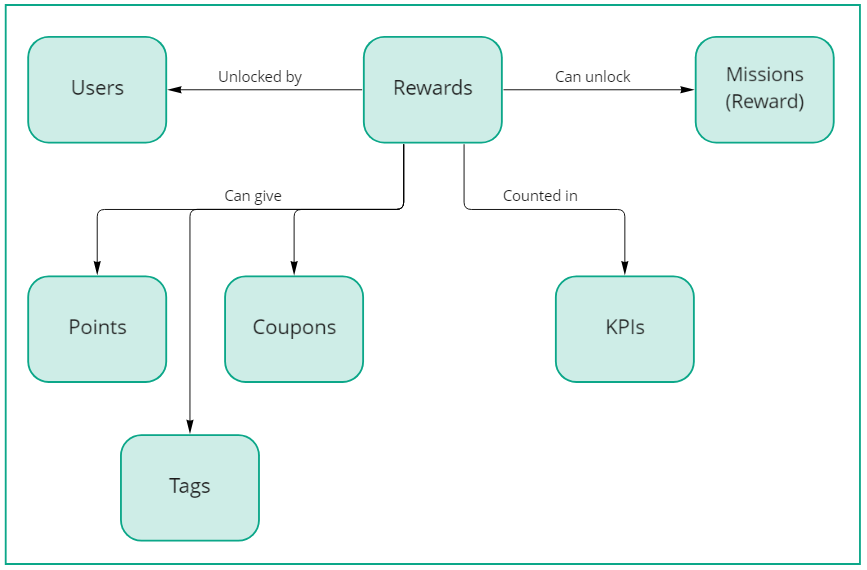
The diagram below provides an overview of how rewards relate to other configuration elements:
Important shared fields
Several fields are shared across different reward types:
Prizes
Rewards can give users prizes in the form of:
Tags can be both added and removed from users. This allows you to use personalisation tags to show or hide elements of your strategy as users progress. For example, after completing a specific course, you might want to show them the next available course while hiding the one they've just completed.
Communication
Define messages shared with users:
- Message: Shown in notifications when users unlock rewards
- Hint: Shown to users before they unlock rewards
- Hide in Widgets: Option to hide rewards in the Profile widget, creating an easter egg or variable reward effect
Availability
Set limitations on reward availability:
- Limited Series: Limit the total number of times a reward can be unlocked across all users
- Valid From/To: Set date ranges when rewards are valid (activities performed before the start date still count towards earning the reward)
- Multi Unlock: Determine if rewards should be unlocked each time criteria are met
- Count Limit: Impose limits on multi unlocks or expirations
Badge
Badges visually display users' capabilities or newly acquired skills, keeping your strategy engaging and colourful.
Tags
Control how your engagement strategy appears to users. More information can be found in the tags section.
By default, tags only control how users see the strategy, not which users can interact with it. Select the Award only if the user's personalization tags match option if you want only users who can see the reward to be able to unlock it.
Effect of tags when retrieving user rewards
When retrieving a user's rewards via the User APIs, you can filter results by specifying tags or by using the user's personalisation tags. To use personalisation tags, set the withPersonalization flag to true in your request.
Tag filtering affects results differently depending on whether you use a list of tags or personalisation tags:
Non-personalisation tags
Specifying filtering tags in the API request limits the response to rewards with those tags. However, the progress for these rewards (including all tracked mechanics such as behaviours, points, and rewards) remains comprehensive and includes elements regardless of their tags.
Personalisation tags
Setting withPersonalization to true in the API request changes the response in these ways:
-
Available rewards: Only rewards with at least one of the user's personalisation tags appear in the available rewards list. Progress for available rewards includes all tracked mechanics, regardless of their tags.
-
Completed rewards: All rewards earned by the user are listed, regardless of tags. This approach supports an easter egg effect, allowing users to discover rewards they might not have initially been aware of.
By strategically applying tag filtering, you can tailor the rewards retrieval process to match user preferences and enhance the overall experience.