Flexible behaviour
Flexible behaviours extend simple behaviours by allowing metadata to be associated with them. When an activity tracks a simple behaviour, all its flexible behaviours are evaluated. If the metadata sent in the activity matches the configured metadata for the flexible behaviour, the flexible behaviour is tracked as well.
Overview
A flexible behaviour acts as an extension of a specific simple behaviour, allowing you to:
- Add contextual information through metadata
- Create complex matching rules
- Apply rate limiting based on metadata values
- Track multiple related behaviours with a single activity
For example, when tracking a "complete_course" behaviour, you might want to differentiate between various completion scenarios based on score, time taken, or course difficulty.
Common use cases
Here are some typical scenarios where flexible behaviours are valuable:
Course completion tracking
- course_id = 12345
- score = 90%
- completion_time = 30 minutes
Sales performance monitoring
- product_id = 51423
- value = $1000
- closed_on = 2022-05-23
Purchase analysis
- sku = 54321
- category = shirts
- colour = blue
To implement these scenarios, define your flexible behaviour and create activities using the simple behaviour's verb along with the relevant metadata.
Metadata rule builder
The rule builder allows you to create conditions based on metadata sent with activities. Each rule consists of:
- A metadata name (left side)
- A condition operator
- A comparison value (right side)
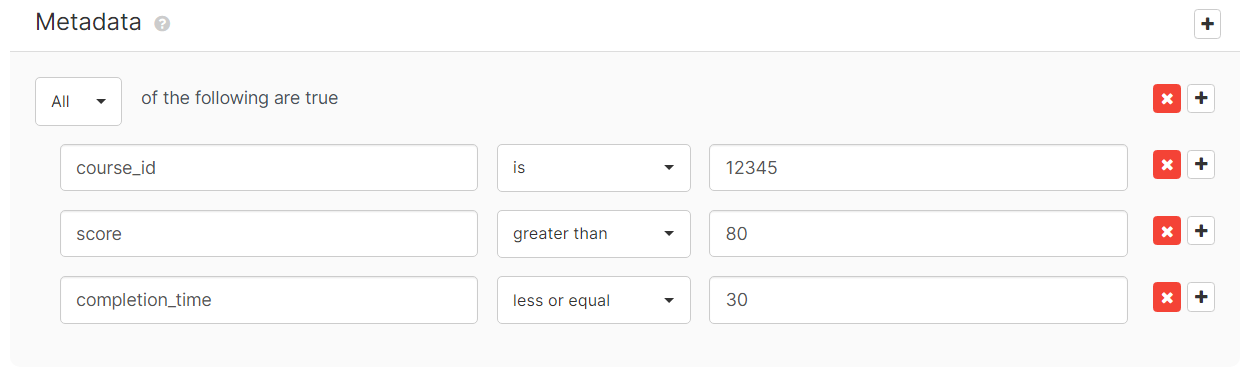
For example, the rules above specify:
- course_id must match 12345
- score must be greater than 80
- completion_time must be less than 30
Condition types
Numeric conditions
- greater than: value exceeds specified number
- greater or equal: value matches or exceeds specified number
- less than: value is below specified number
- less or equal: value matches or is below specified number
Date conditions
- on: exact date match
- not on: date does not match
- after: date is later
- on or after: date matches or is later
- before: date is earlier
- on or before: date matches or is earlier
Text conditions
- contains: text includes specified value
- does not contain: text excludes specified value
- starts with: text begins with specified value
- does not start with: text does not begin with specified value
- ends with: text concludes with specified value
- does not end with: text does not conclude with specified value
Universal conditions
These work for both numeric and text values:
- is: exact match
- is not: no match
Text conditions are case-sensitive and dates must use ISO 8601 format in UTC timezone: YYYY-MM-DDThh:mm:ss.sssZ
- YYYY: four-digit year (e.g. 2022)
- MM: two-digit month (01-12)
- DD: two-digit day (01-31)
- hh: zero-padded hour (00-23)
- mm: zero-padded minute (00-59)
- ss: zero-padded second (00-60)
- sss: milliseconds (000-999)
Complex conditions
All and any operators
Combine conditions using:
- All: requires all nested conditions to be true (AND operation)
- Any: requires at least one nested condition to be true (OR operation)
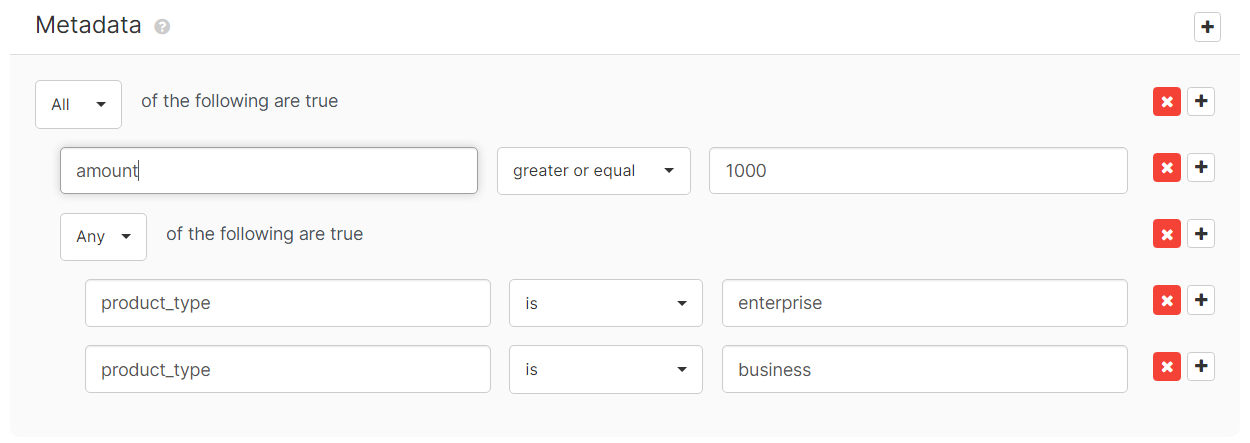
The example above matches when:
- amount is greater than 1000 AND
- product_type equals either enterprise OR business
Wildcard functionality
A wildcard (*) is a special value that matches any other value when used in flexible behaviour conditions. Wildcards can only be used with the is condition type and serve two main purposes:
Configuration wildcards
Configure a metadata condition to use a wildcard as the expected value to match any value sent in an activity:
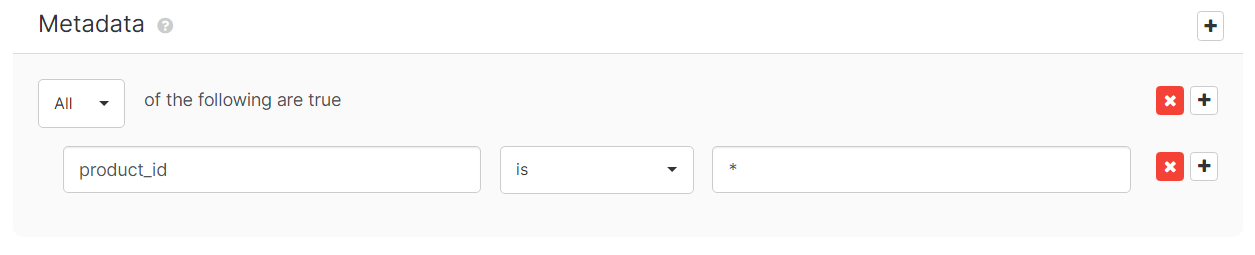
In this example, the flexible behaviour matches any activity that includes the product_type metadata, regardless of its value.
Rate limiting with wildcards
When using a wildcard condition, you can apply rate limits based on unique metadata values:
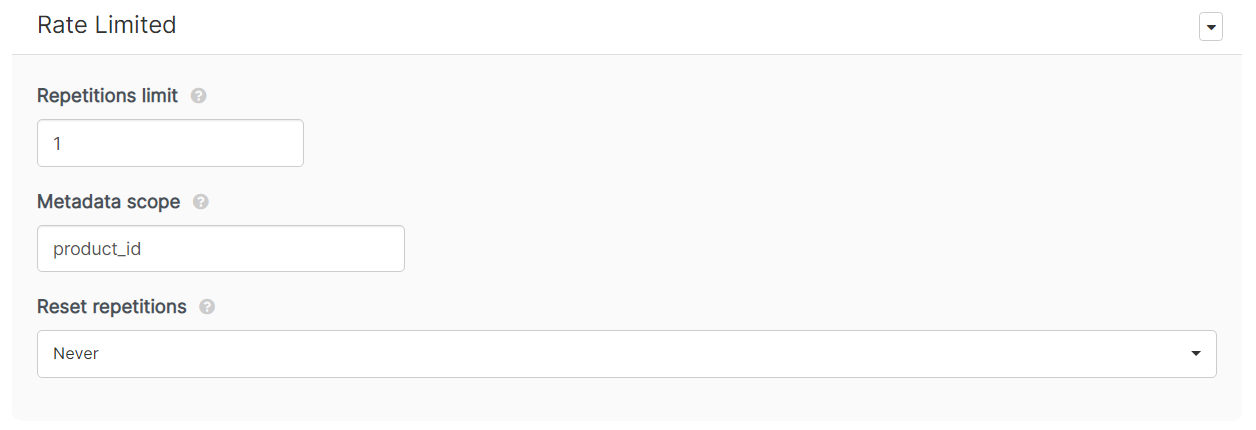
Example with rate limit of 1:
- First activity with product_type=enterprise: matches
- Second activity with product_type=enterprise: exceeds limit, no match
- First activity with product_type=business: matches
- Second activity with product_type=business: exceeds limit, no match
The rate limit applies separately to each unique value of the metadata field.
Ensure metadata names in activities exactly match those in your rule configurations.