Points
Points are the fundamental unit of measurement in gamification strategies, quantifying user progression and achievement. They serve as versatile tools that can be used to track progress, unlock rewards, and drive engagement. What makes points particularly powerful is their ability to serve multiple purposes within the same strategy.
Point movement types
- Absolute status points: Track total progression over time, providing a comprehensive view of user achievement
- Marginal status points: Measure progression within specific time periods for competitions or challenges, resetting when the challenge ends
- One-way status points: Only increase, never decrease, creating a sense of constant progression
- Two-way status points: Can decrease when users fail tasks, perform negative actions, or remain inactive. Use the Negativeable setting to allow negative increments, and the Stop at Zero setting to prevent the balance from going below zero.
Functional point types
- Experience points (XP): Earned through completing desired behaviours or achievements, representing skill development
- Status points: Used for ranking users in levels, similar to airline frequent flyer tiers
- Redeemable points: Virtual currency that users can exchange for rewards like coupons (activated via the "Redeemable" setting)
- Reputation points: Earned through quality contributions and positive actions, reflecting user standing in the community
- Gift points: Transferable between users, usable for rewards or recognition (activated via the "Giftable" setting)
- Expiring points: Create urgency by requiring redemption within a specific timeframe (configured through the "Expirable" setting)
- Bounty points: Allow users to incentivise actions amongst themselves, particularly useful in Q&A scenarios (activated via the "Bountiable" setting)
Using points to track external metrics
Points can track any external quantitative metric, such as:
- Task completion time
- Revenue generated by sales executives
- First call resolution rates in contact centres
Configure decimal precision in the point settings to accurately track continuous metrics. Create activities to modify these metrics directly.
Point relationships
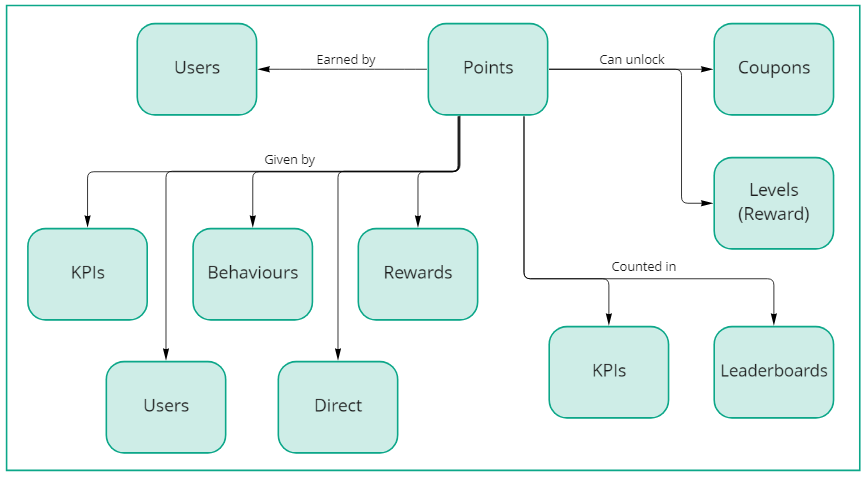
The diagram below illustrates how points integrate with other configuration elements:
Understanding point wallets
Each user has exactly one wallet per Point. Wallets are created automatically: when a Point is created, one wallet is provisioned for every existing user; when a new user is created, one wallet is provisioned for every existing Point.
A wallet holds only the running balance counters for a user: how many points they have earned, spent, and lost to expiry. It does not record the history of how those counters were reached. For the full history of individual point movements, see Point transactions below.
Understanding point balances
Use the GET User Wallets API to retrieve a user's point information. The API returns six values for each Point:
- Grand total: Lifetime sum of all positively-awarded points. Never decreases due to spending or expiry.
- Total:
grandTotalminusexpiredTotal. Points awarded that have not been reclaimed by expiry, whether spent or still available. This is the value tracked by leaderboards, KPIs, and levels. - Balance: Points currently available for spending. Tracked independently. It is not computed from other fields. Decreases when points are spent or when unspent points expire; increases when points are awarded or refunded.
- Spent: Cumulative points redeemed by the user (on rewards, coupons, or via negative increments).
- Expired: Cumulative total of all points processed by the expiration job. This includes the full original value of each expired increment, even if some of those points had already been spent before the increment expired.
expiredBalanceThe number of points that user actually forfeited to expiry (i.e. the unspent portion of all expired increments) can be calculated with the following formula:
expiredBalance = grandTotal − balance − spent
When an increment expires, only the unspent portion of that increment is removed from the balance. Points that had already been redeemed from that increment were deducted from the balance at the time of redemption and are not deducted again at expiry.
Use expiredBalance to find the points the user genuinely lost to expiry. Use expired for accounting purposes: it reflects the full value of every increment that passed through the expiration process.
Example: A user earns 100 points and spends 30 of them. The 100-point increment then expires.
| Field | Value | Explanation |
|---|---|---|
grandTotal | 100 | Lifetime earnings, never reduced |
expired | 100 | Full value of the expired increment |
total | 0 | grandTotal − expiredTotal = 100 − 100 |
spent | 30 | Points redeemed by the user |
balance | 0 | Nothing left to spend |
expiredBalance | 70 | Unspent points lost: 100 − 0 − 30 |
Point transactions
Every change to a wallet is recorded as a transaction. Transactions form the complete audit trail of all point activity for a user.
Each transaction record includes:
- Type: The kind of operation that occurred (see table below).
- Points (total): The point amount involved in the transaction.
- Points (redeemable): For
incrementtransactions only, the number of points from this increment that are still available to spend. This value decreases over time as the user spends from this increment. - Points (redeemed): For
incrementtransactions only, the number of points from this increment that have already been spent. This value increases as spending occurs. - Expiry date: The date on which this increment's points will expire, if the Point is configured as expirable.
- Debited: Whether the expiration job has finished processing this increment (i.e. the expired points have been removed from the balance).
- Rejected: Whether this transaction has been reversed, typically because the activity or reward that caused it was cancelled.
- Source: The activity that triggered this transaction.
- Parent: The mechanic (behaviour, reward, coupon, or KPI) that caused the points to change.
- Processed date: When the transaction was recorded. Note: this may differ from the activity's own creation date, which can be overridden.
| Transaction type | When it is created |
|---|---|
increment | Points awarded to a user. The amount can be positive (a credit) or negative (a debit, e.g. a penalty or fee). |
redeem | The user spends points, e.g. purchasing a reward or activating a coupon. |
refund | Previously redeemed points are returned to the user's balance, e.g. when a reward is cancelled. |
set | The wallet balance is directly overridden to a specific value (requires the Settable flag on the Point). |
Each transaction references its source activity and parent mechanic, enabling every point movement to be traced back to its business cause.
Spending order (FIFO)
When points are spent (via a redemption, a coupon, or a negative increment), the system must decide which previously-awarded increments to draw from. The rule is first in, first out by expiry date: the increment that expires soonest is consumed first. Points that never expire are always consumed last.
This behaviour is automatic and requires no configuration. It minimises the risk of earned points expiring unused, because the user always spends their most time-sensitive points first, regardless of when they were awarded.
Example: A user has two increments: 50 points expiring in 10 days, and 100 points that never expire. When they redeem 60 points, the system takes all 50 from the expiring increment and 10 from the non-expiring one. The user retains 90 non-expiring points.
Spent vs. removed from the wallet
When an expirable increment reaches its expiry date, its transaction enters the expired state and any still-unspent points are removed from the wallet. An expired transaction does not automatically mean the user lost points: they may have spent some or all of those points before the expiry took effect. To tell the two cases apart, read the points object on the transaction:
points.total: the original amount awarded by the increment.points.redeemed: how many of those points the user spent before the increment expired.points.redeemable: always0on an expired transaction. No further points can be drawn from an increment once it has expired.
The amount removed from the wallet when the increment expired is total − redeemed.
Example: A user is awarded 100 points and spends 30 of them. The increment then expires. The points object on the resulting expired transaction looks like:
{ "total": 100, "redeemed": 30, "redeemable": 0 }
In this record, 30 points were spent and 100 − 30 = 70 points were removed from the wallet. This per-transaction view is the building block of the wallet-level expiredBalance figure described in Understanding point balances: summing total − redeemed across all expired transactions for a user/Point yields that user's expiredBalance.
Point settings reference
Behavioural flags
| Flag | Effect |
|---|---|
| Redeemable | Points can be spent by the user on rewards and coupons. |
| Giftable | Points can be transferred from one user to another. |
| Bountiable | Points can be used as bounties that users offer to incentivise actions by others. |
| Expirable | Points carry an expiry date computed from the configured expiration rule. An expiration rule must be set when this flag is enabled. |
| Settable | The wallet balance can be directly overridden to a specific value via a set transaction, bypassing the normal increment and redeem lifecycle. |
| Negativeable | Negative increment values are permitted. If Stop at Zero is not also enabled, the wallet balance may go below zero. |
| Stop at Zero | Prevents the wallet balance from being driven below zero by negative increments. Requires Negativeable to also be enabled. |
Incompatible flag combinations
The following combinations are rejected by the platform:
| Combination | Why incompatible |
|---|---|
| Settable + Redeemable | A settable Point overrides the balance directly; spending via redemption would conflict with that model. |
| Settable + Expirable | set transactions reset the balance to a fixed value; expiry semantics would become undefined. |
| Settable + Giftable or Bountiable | Direct balance override is incompatible with transfer-based flows. |
| Redeemable + Stop at Zero | Stop at Zero is designed for points that decrease via negative increments, not user-initiated redemptions. These two flags are mutually exclusive. |
| Stop at Zero without Negativeable | Stop at Zero only affects negative increments, which require Negativeable to be enabled. Enabling Stop at Zero without Negativeable would have no effect and is therefore prohibited. |
Immutable flags
The following flags cannot be changed after the Point is created:
| Flag | Reason |
|---|---|
| Settable | Changing it would make existing set transactions inconsistent with the wallet model. |
| Negativeable | Retroactively changing this would alter the meaning of wallets that carry a negative balance. |
| Stop at Zero | Retroactively changing this would alter the meaning of wallets that were capped at zero. |
Related topics: