Behaviours
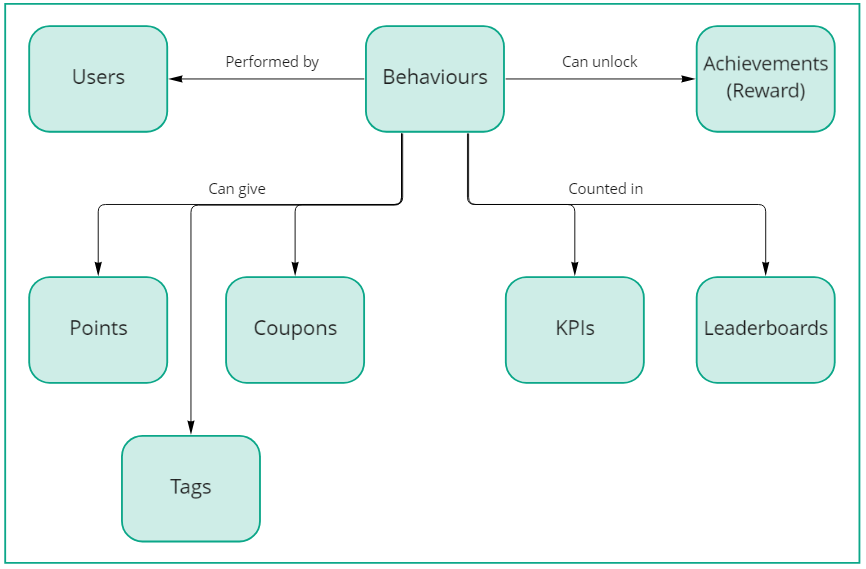
Behaviours are the foundation of user engagement tracking in your applications. They help you monitor and reward meaningful user activities, from basic interactions to complex, condition-based achievements.
Quick start
- Choose your behaviour type:
- Simple behaviours for basic activities (e.g., logging in, completing a profile)
- Flexible behaviours for complex tracking (e.g., purchasing items above a certain value, completing specific course combinations)
- Configure rewards
- Start tracking your activities
Understanding behaviours
Behaviours can track any user interaction with your applications, for example:
- Basic activities (logging in, viewing content)
- Complex interactions (purchases with specific conditions)
- Course completions
- Community engagement
- Custom application events
Simple vs flexible behaviours
| Feature | Simple behaviours | Flexible behaviours |
|---|---|---|
| Use case | Basic activity tracking | Complex conditional tracking |
| Metadata | No | Yes |
| Rule building | No | Yes |
| Implementation | Straightforward | Requires additional configuration |
Core configuration options
Prizes
Configure what users receive for completing behaviours:
Example: Award 50 experience points and a "course-complete" tag when a user finishes training.
User experience
Control how behaviours appear to users:
Communication settings:
- Message: Notification text when behaviour is completed
- Hint: Guidance shown before the behaviour is completed
- Widget visibility: Option to create hidden behaviours
Activity tracking:
- Content tracking: What was completed (e.g., "Core Values course")
- Target tracking: Where it was completed (e.g., "Company Culture section")
Example activity stream: "Mark completed the Core Values course in Company Culture"
Limitations and control
Rate limiting:
- Overall limits (e.g., first-time login bonus)
- Periodic limits (e.g., daily login rewards)
Security:
- JavaScript tracking permissions
- Behaviour-specific security settings
Organisation
Tags:
- Control strategy visibility
- Filter eligible users
- Enable personalisation
Example: Show advanced courses only after completing basic training by using tags.
Best practices
- Start with simple behaviours for basic tracking
- Use clear, descriptive names for behaviours
- Test rate limits thoroughly
- Configure meaningful activity stream messages
- Use tags for progressive content revelation or personalised content strategies
Troubleshooting
Common issues and solutions:
- Behaviour not tracking: Check JS security settings
- Rewards not distributing: Verify rate limits
- Widget not showing: Check visibility settings