KPIs
Overview
KPIs are used to create recurring goals and objectives for your users. They provide a structured way to track user progress towards specific targets over various time periods.
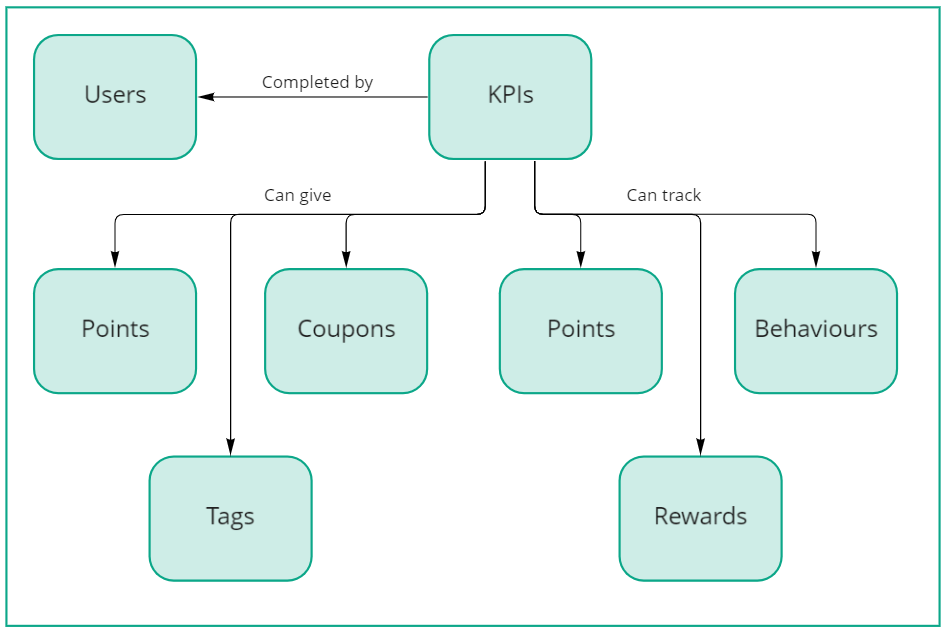
KPIs can track points, behaviours or rewards with goals being set for daily, weekly, monthly, quarterly and yearly objectives. Remember that points can be used to track external metrics as well, making it possible to create KPIs for virtually any measurable activity.
KPIs track mechanics at a granular level of detail, giving you access to user performance data on a daily, weekly, monthly, quarterly and yearly basis. This allows you to:
- Monitor day-to-day user progress
- Show users their performance compared to previous time periods
- Create visual indicators like sparklines to display behaviour trends
- Set up duels or challenges between users based on precise metrics
The diagram below provides an overview of how KPIs relate to other configuration elements:
Define KPI targets
Once you have identified which mechanic your KPI will track, you can define targets for your users to achieve. You can also create KPIs with no targets which simply give visibility of the underlying metric to the users.
Each target must specify a validity period - the timeframe during which the target will be active. If you don't have a specific end date for the target, select a date far enough in the future to avoid frequent adjustments.
After specifying the validity period, you can set targets for your users to achieve daily, weekly, monthly, quarterly or yearly. The time periods are determined based on the time zone selected when you create the site that contains the KPIs.
Targets can be assigned to:
- All users assigned to the KPI (Everyone)
- Specific individual users
- Groups of users via tags
You can define as many targets as needed, but follow this important rule: validity periods should not overlap for the same users. This means:
- If you have targets defined for Everyone between January and February, you cannot define different targets for Everyone using the same or overlapping time period
- The same applies to targets for individual users or groups of users
- This prevents confusion about which targets should apply during a particular time period
Changing targets for a KPI will recalculate the progress and prizes for each user. Only change targets if there was an actual change of target during that time period and you want the users' prizes to be recalculated.
For new time periods, adjust the existing target end date and create new targets starting where the previous ones end. This ensures users keep their existing progress and prizes while new targets are created for the new time period.
Using RAG status
RAG (Red, Amber, Green) is a traffic light system that visually indicates to users where they stand in relation to their targets:
- Red: Not performing well
- Amber: Making progress
- Green: Hitting targets
KPIs can implement RAG status based on the percentage of target completed. If you're tracking a point with the KPI, you can also use the point as the unit of measure for the progress bar. For example, if tracking sales revenue, the progress bar could display $0k to $10k in sales rather than showing a percentage.
RAG statuses offer flexible configuration options:
- Define lower and upper limits for progress bars (not limited to 0-100%)
- Example: Your percentage progress could range from 50% to 150%
- Example: Sales revenue progress could show from $5k to $15k
- Choose how many colours or shades to use (simple 3-colour system or varying shades as users approach targets)
Implementation example:
Prizes
KPIs can award prizes just like behaviours and rewards. KPI prizes can include:
The main difference is that KPIs require you to specify which target the prizes will be applied to - daily, weekly, monthly, quarterly, or yearly. If you want to award prizes for different targets, you can clone the KPI and configure the relevant prizes for each target type.
KPIs provide enhanced control over point awards:
- Target achievement: Award points when users hit their targets
- Progress-based awards: Award points based on percentage progress
- Example: If a user can earn 100 points total and achieves 50% of their target, they receive 50 points
- When they progress another 10%, they earn 10 more points, and so on
- Bonus points: Award additional points for exceeding targets
- Calculated as a percentage over the target achieved
- Example: If bonus points are enabled with 100 prize points and a user exceeds their target by 50%, they earn an additional 50 points
Assign KPIs to users
Unlike other mechanics in the system, KPIs need to be explicitly assigned to:
- Specific individual users
- Groups of users via tags
This allows you to tailor KPIs to different user segments or performance levels.
Suggested behaviours and rewards
KPIs allow you to suggest behaviours that users should perform or rewards they can focus on to make progress towards their targets. This creates a clear path for users to follow.
These suggestions aren't currently shown in the standard widgets but can be implemented by:
- Customising the profile widget's grid template
- Displaying them when using the APIs to access KPIs
Example use case: For a sales KPI tracking revenue, you might suggest behaviours like "Complete product training" or "Schedule client meetings" that will help users achieve their targets. Users can see both their progress and concrete next steps.