Custom fields
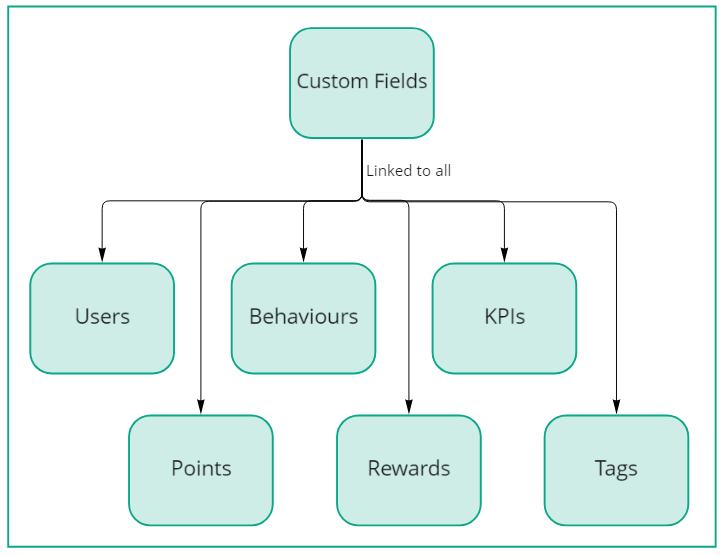
Custom fields allow you to add additional data to users, points, behaviours, rewards, KPIs and tags in Mambo. They provide flexibility to store text, numbers or images that enhance your platform's functionality.
What are custom fields?
Custom fields are data containers that let you extend the standard properties of different platform elements. They enable you to, for example:
- Store additional user information
- Add properties to gamification elements
- Create dynamic configuration options
- Customise how your application displays Mambo data
Use cases
Enhanced data storage
Custom fields excel at storing supplemental information:
- User profile data (phone numbers, social media links, preferences)
- Extended descriptions for rewards or achievements
- Category information for behaviours or points
- Configuration parameters for specific gamification elements
UI customisation
Bring configuration into the administration panel and out of your code:
- Store colour codes for different gamification elements
- Keep UI labels that can be edited without code changes
- Define visual styling parameters
Progressive gamification
Create more sophisticated gamification mechanics:
- Store progress images for badges that update visually as users advance
- Keep track of custom completion metrics
- Add tier information to rewards or levels
Supported connections
Custom fields can be linked to various platform components as illustrated below:
Creating custom fields
To add custom fields to your platform:
- Navigate to the custom fields configuration
- Select the element type you want to extend (user, point, behaviour, etc.)
- Choose the appropriate field type (text, number, or image)
- Configure the field properties and save your changes
Best practices
- Use meaningful names for your custom fields to make them easier to identify
- Consider using custom fields for configuration that may need to change rather than hardcoding values
- Remember that custom fields can be accessed through the API for dynamic integration