Quizzes
Quiz mode turns a campaign into something with right and wrong answers. You mark the correct ones and say what each is worth, and the campaign totals the score as the participant goes. At the end, the score decides what they are told and what they earn.
Quiz mode cannot be used together with poll mode. See campaign settings.
What can be scored
Anything where an answer can be right or wrong: single and multiple choice, dropdowns, image choice, opinion scales, Net Promoter Score, matrices and rankings.
Ratings and free text cannot be scored. There is no correct answer to how satisfied someone is, and Mambo will not try to mark one. Text answers are not scored either, since matching them reliably is not something a campaign can promise. Both types can still appear in a quiz, they simply do not contribute to the score. See Question types.
Marking answers
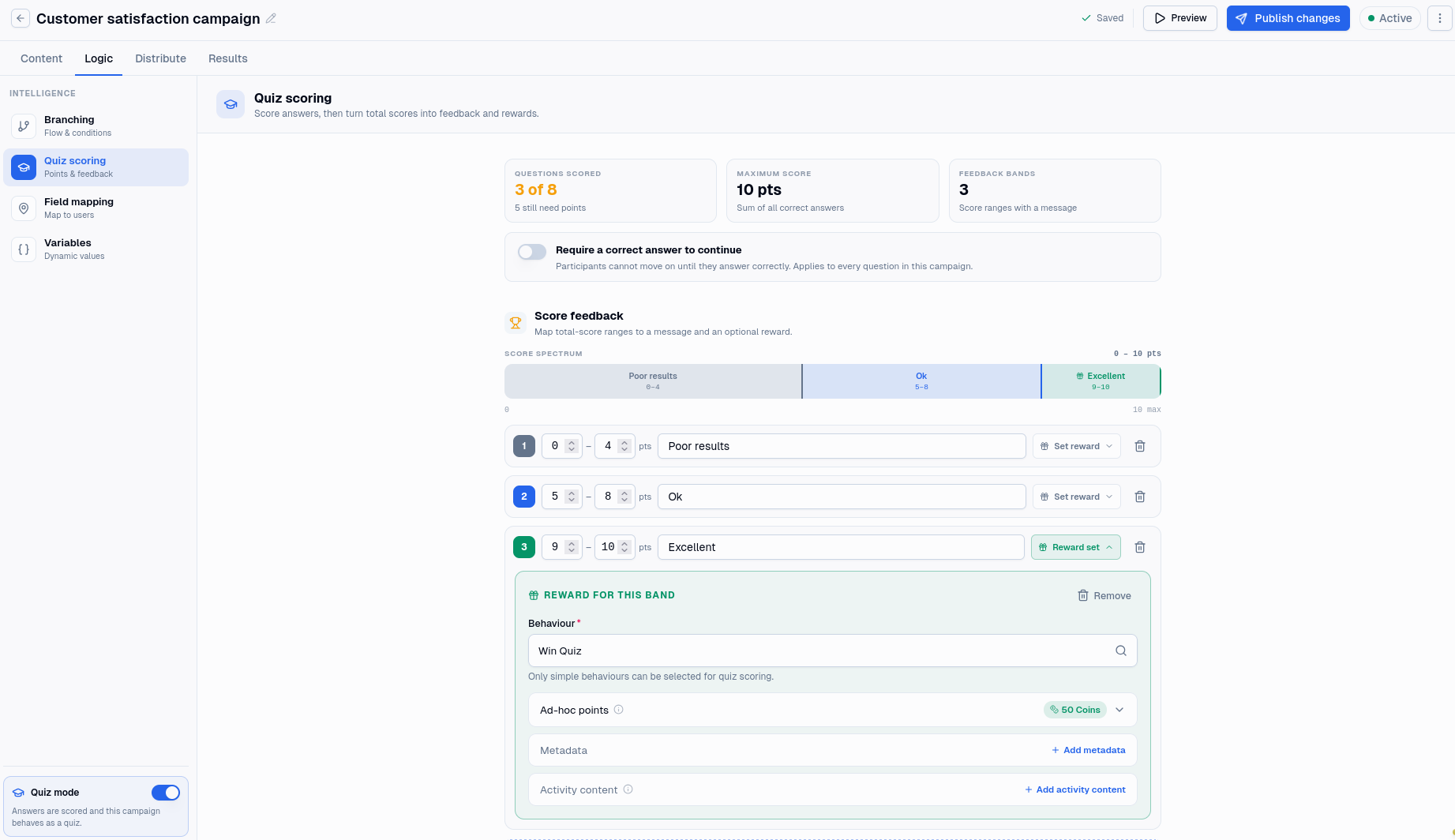
Each scorable question gets an answer key: which options are correct, and how many points each is worth. The editor tracks how many questions still need one, and adds up the maximum score.
Where a question can take more than one answer, a scoring rule decides what counts as correct:
- Any correct option counts. Picking one right answer scores it.
- All correct options required. Every right answer must be picked, or the question is marked wrong.
Be careful with that second rule on a question that only accepts one answer. If you mark two options correct on an opinion scale and require all of them, nobody can pass, because no participant can choose both.
Three types have keys of their own shape:
Matrix questions are keyed per row, with an optional bonus for getting every row right. A participant counts as correct only if none of the rows they answered is wrong, so one slip costs the whole question. Rows they left alone are not held against them.
Ranking questions are keyed as an exact order, and scored all or nothing. The submitted order matches or it does not.
Opinion scales and NPS are keyed on the step, not on a band. Marking "9 and 10" correct on an NPS question means exactly those two steps.
You can also set a wrong answer message per question, shown when a participant gets it wrong.
Requiring a correct answer
One setting applies to the whole campaign: require a correct answer to continue. Participants cannot move past a question until they answer it correctly.
It changes what a quiz is for. With it off you are measuring what people know; with it on you are teaching them, because nobody finishes with a wrong answer recorded. Turn it on for training, leave it off for assessment.
Feedback bands
A band maps a range of total scores to a message and, if you want, a reward.
Bands are how a quiz says something useful at the end rather than just a number: one message for a participant who scored 0 to 4, another for 5 to 8, another for 9 to 10. The editor warns you if a band reaches past the maximum score anyone can actually reach, which usually means a band was written before the questions were finished.
Each band can fire a behaviour, so a participant who scores well earns something different from one who scrapes through, and can award points alongside it. Only simple behaviours can be chosen here, as elsewhere in campaigns. See Distributions for the rewards that fire regardless of score.
The matched band is available as a variable, along with the score itself, so the message can be written into an ending rather than only shown as feedback.
Who gets scored
A session is scored when it completes. A participant who abandoned, was disqualified or was turned away is not scored at all, and earns no band reward. That includes anyone disqualified by running out of time: they are not marked wrong, they are simply not marked. See Timers.
Reading quiz results
Results shows the mean score across the campaign, and marks each scored question with how often it was answered incorrectly.
Two of the type-specific rules surprise people, so they are worth repeating where you will see them: a matrix counts as correct only when no answered row is wrong, and a ranking counts only when the whole order matches. In both cases the figure beside the grid is the other half of the picture, how often each individual row or item was placed correctly. See Results.