Campaign settings
Campaign settings cover the whole campaign rather than any one page: what a participant sees around your questions, how they are allowed to answer, how long they have, and how many responses you will take.
They are grouped into Display settings, General settings, Identification, Timer and Response limits. Quiz scoring and variables are not here; they live on the Logic tab.
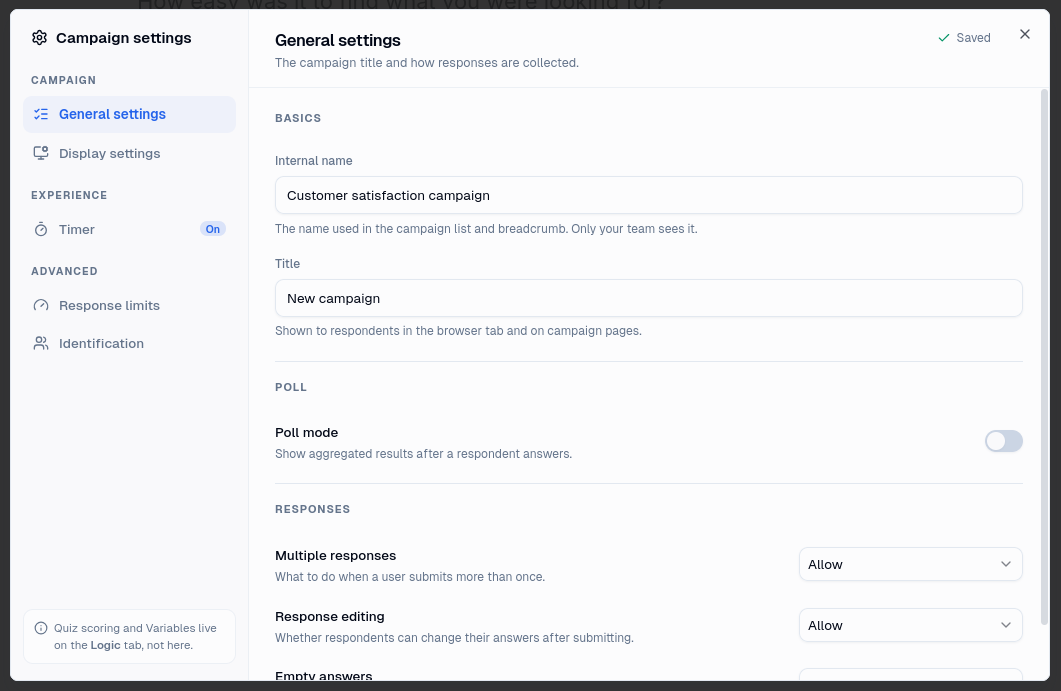
Name and title
A campaign has two names and they are for different readers.
The internal name is what appears in the campaign list and the breadcrumb. Only your team sees it, so it can say whatever helps you find the campaign again.
The title is what participants see, in the browser tab and on the campaign pages. It lives in Display settings, alongside the switch that decides whether it is shown at all.
The internal name is one of only two settings that save the moment you change them. The other is the Active switch. Everything else on this page is a draft change and does nothing until you publish.
Active and inactive
Switching a campaign inactive stops it accepting anyone new, across every distribution at once. It is the fastest way to take a campaign down without deleting anything, and switching it back on restores it just as quickly.
Four things must all be true before someone can start a session: the campaign is published, the campaign is active, the distribution is published, and the distribution is active. Switching off either the campaign or the distribution is enough to stop it.
Sessions already in progress are not affected. Someone part way through when you switch the campaign off can still finish.
Display settings
Display settings describe what a participant should see around your questions. Mambo works out what each participant gets and hands the result to your integration, which displays it, so a setting switched off here simply never reaches them.
| Setting | What it does |
|---|---|
| Title | The wording shown to participants. |
| Show campaign title | Whether that title is shown at all. With it off, no title is sent. |
| Progress bar | Hidden, at the top of the page, or at the bottom. |
| Show page titles | Whether each page's title is shown to participants. |
| Show page numbers | Whether pages are numbered as participants move through them. |
| Question numbers | Hidden, restarting on each page, or counting across the whole campaign. |
| Show exit link | Whether participants can leave before finishing. |
| Mark required answers | Whether required questions are flagged as such. |
| Confirm empty answers | Whether leaving an answer blank asks for confirmation first. |
| Default next button | The label on the button that advances a page. |
| Default previous button | The label on the button that goes back. |
The two button labels are defaults. A page can override either, which is useful when one page should say "Start" or "Send my answers" instead. See Building a campaign.
Page numbers count pages the participant actually sees. A page that logic skips is not counted, so the numbering stays continuous even when the route through the campaign is not.
General settings
Poll mode shows participants how everyone else answered. The results appear once they reach the ending, not question by question as they go, and they cover the whole campaign rather than only the distribution the participant came through.
Response editing decides whether participants can go back and change an answer they have already submitted. With it disallowed, the previous button does nothing and each page is answered once. It cannot be combined with page timers, since a page under a clock is by definition answered once.
Empty answers decides whether a question may be left blank. This is the campaign default, and every question can overrule it:
- Disallow here and every question is required unless you mark it optional.
- Allow here and every question is optional unless you mark it required.
Setting it on the question always wins, so the campaign setting is about which way round you want to work rather than a rule questions must obey.
Poll mode and quiz mode cannot both be switched on. One grades an answer and the other reports it, and a campaign cannot do both at once.
Time limits
A campaign can be given a time limit, and so can an individual page. Both are configured with the same handful of settings, and both end the session when they run out, so a limit with no action configured enforces nothing. See Timers.
Response limits
A campaign can cap how many responses it will accept, overall or per period. The cap counts every response to the campaign, whichever distribution it came through. Distributions can set their own caps underneath it, which ration the campaign's ceiling rather than replacing it. See Response limits.
Identification
Identification settings decide what happens when Mambo works out who a participant is: whether to create a user who does not exist, whether to update one who does, and whether to accept a second response from someone who has already taken part. They only do anything if at least one question is mapped to a user field. See Identifying participants.