Identifying participants
A campaign that knows who answered can do things an anonymous one cannot: reward the participant, keep them from answering twice, and write what it learns onto their user record.
Knowing who someone is has two halves. Field mapping decides which answers go where on a user profile. Identification settings decide what Mambo does with that information.
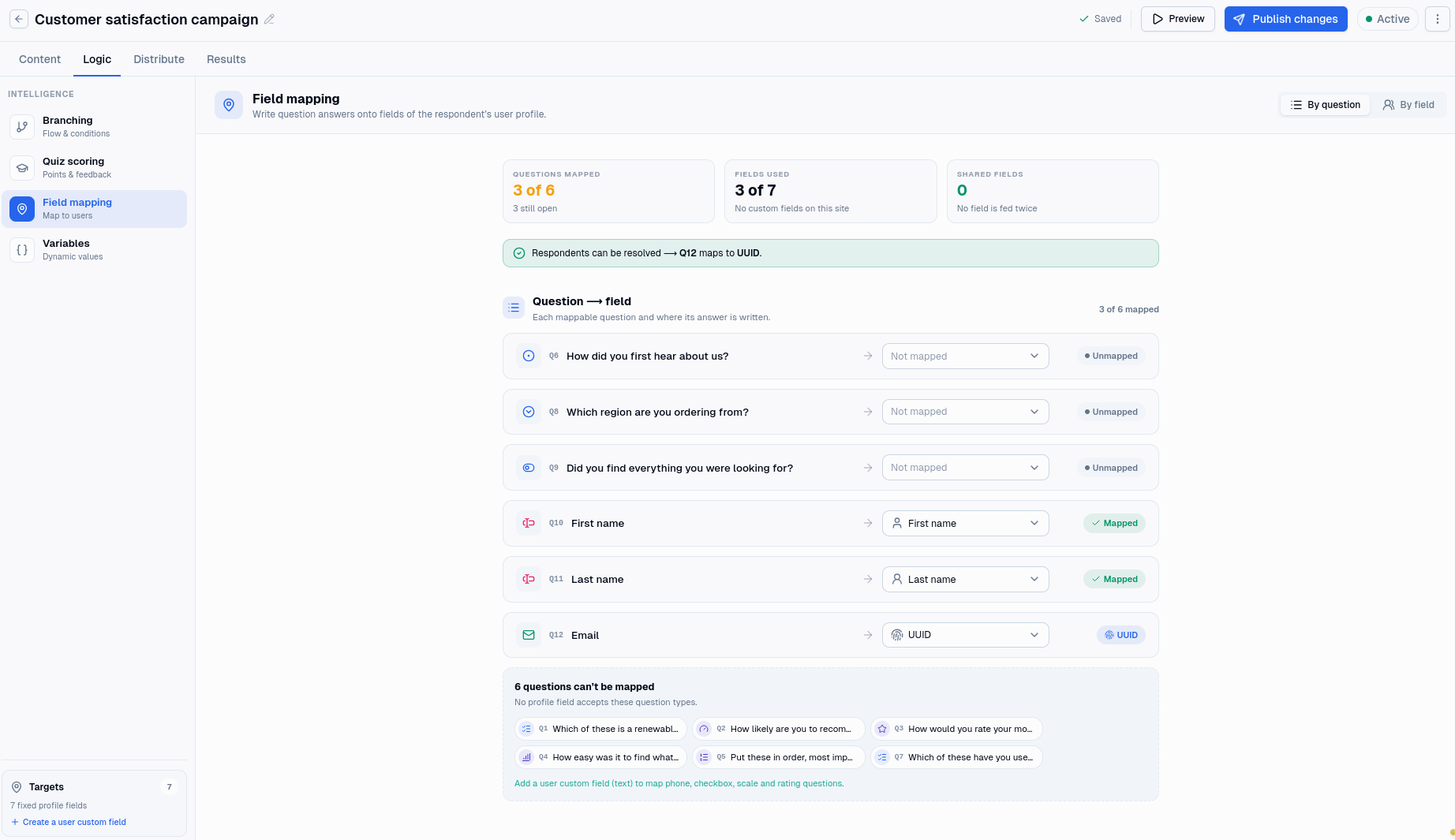
Field mapping
Any question can send its answer to a field on the participant's user profile. The mapping lives on the question, so a campaign does not need a special page for it, and you can collect profile details anywhere that suits the conversation.
There are seven fixed profile fields: UUID, first name, last name, email, display name, date of birth and gender. A question can also write to any text custom field you have defined for users.
Not every type can fill every field. A date question can fill a date of birth, an email question can fill an email address, and a multiple-choice question can fill nothing at all, because there is no single value to write. See Question types for the full picture.
The UUID rule
If any question maps to a profile field, one of them must map to UUID. Publishing is refused until that is true.
The UUID is how Mambo recognises a participant. Without one, a campaign collecting first names and email addresses has no way to tell whether this is someone it already knows, so it cannot decide whether to create a user or update one. A custom field does not satisfy the rule, however identifying its contents look.
In practice the UUID question is whatever your users are identified by elsewhere in Mambo: often an email address, sometimes an employee or customer number. See Users.
Two questions, one field
Nothing stops two questions writing to the same field, and the editor points it out when they do. It is worth looking at, because the later answer wins and that is not always what was meant. Asking for an email on page one and again on page six, and mapping both, means the second quietly overwrites the first.
When identification happens
This is the part worth understanding, because it decides when rewards fire and which variables have values.
If your integration says who is starting the session, the participant is known from the first page. Their details are available to wording and rules throughout, and the distribution's participation reward fires as they begin.
If the session starts anonymously, nobody is identified until the participant reaches the end. Only then are the mapped answers gathered up and matched against your users. Until that moment the participant variables are empty, and a rule testing one will not match.
A participant who is never identified is never rewarded, because there is no user to reward.
Identification settings
Four settings decide what happens once a participant is identified. They only do anything if something is mapped.
Create missing users creates a user record for a participant Mambo has not seen before.
Update existing users writes the mapped answers onto the record of a participant it has seen before.
Missing users and existing users each decide whether that participant is allowed to continue at all: Allow, or Disqualify.
The two pairs do different jobs, and it is easy to read them as the same. The switches decide whether a user record is written. The policies decide whether the response is accepted. You can update a returning participant's details and still disqualify them, or create a user for a newcomer and still turn them away.
Multiple responses decides whether someone who has already taken part may do so again. Set it to Disqualify and a second attempt is turned away.
When a participant is turned away
A session that is refused on identification is recorded as a failed authentication, and Results counts it separately from an abandoned or disqualified one. There are four reasons:
- They are already a user, and existing users are set to Disqualify.
- They are not a user, and missing users are set to Disqualify.
- They have already taken part, and multiple responses are set to Disqualify.
- Their details could not be saved, which usually means an answer did not fit the field it was mapped to.
Anonymous participants
A distribution can refuse anonymous sessions outright, which is a different thing from the settings above: it stops a session starting rather than ending one at the last moment. If a campaign only makes sense for people you already know, that is the cleaner way to say so. See Distributions.
Custom fields that change
Mappings are kept in step with the custom fields they point at. Renaming a custom field updates the questions that map to it. Deleting one, or changing it so it no longer applies to users, clears the mapping instead, and those questions stop writing anywhere.