Leaderboard widget
The Leaderboard Widget renders a specified leaderboard on the page and can be configured to display results for different time periods (day, week, month or all-time).
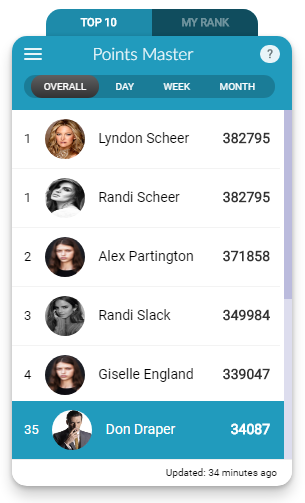 The Leaderboard Widget displaying user rankings with points and positions
Implementation
To render the Leaderboard Widget, add a call to the Mambo leaderboard() function in the mamboCallbacks() array. The example below shows all available options. Note that the only required option is leaderboardId, so you could simply use: Mambo('.selector').leaderboard({leaderboardId: <id>}).
Configuration options
Each option is explained in detail below. Note that only the leaderboardId option is required.
Basic configuration
| Option | Description | Default Value | Sample Value |
|---|---|---|---|
| leaderboardId | Specifies which leaderboard to display. If not provided, the widget will display a message asking to select a leaderboard. The leaderboardId can be found in the administration panel. | N/A | 8ds8a98asd787a |
| title | Overrides the default title of the widget. | N/A | My Ranking |
| height | Sets the height of the leaderboard element in pixels. | 500 | 400 |
Display options
| Option | Description | Default Value | Sample Value |
|---|---|---|---|
| withMenu | Determines whether to display a navigation menu showing all available leaderboards. | true | false |
| picClass | Overrides the default icon used when broken profile images are identified. | mambo-sprite mambo-silhouette-lg | my-picture-icon |
| useUnits | Determines whether to show units of measure for points being tracked by the leaderboard. Only applies to leaderboards based on a single point type. | false | true |
Time period and pagination
| Option | Description | Default Value | Sample Value |
|---|---|---|---|
| period | Determines the time frame for retrieving leaderboard data. Accepted values: day (today's leaderboard), week (current week), month (current month), and all (overall leaderboard). | all | month |
| page | Specifies which page of leaderboard users to retrieve (zero-indexed). | 0 | 1 |
| count | Specifies the number of leaderboard users to retrieve per page. | 10 | 20 |
| myRankCount | Specifies how many users to show above and below the current user. For example, a value of 10 will display the top 10 users, the current user, and the bottom 10 users. | 10 | 20 |
Points information
| Option | Description | Default Value | Sample Value |
|---|---|---|---|
| hasEarnPoints | Determines whether the "How do I earn Points?" link is displayed. Recommended to leave enabled. | true | false |
| earnPointsUrl | Provides an alternative behaviour for the "How do I earn Points?" link. By default, this opens a popup with available behaviours. If set, the link will open the specified URL instead. | N/A | http://mydomain.com/profile/user |
Tab options
| Option | Description | Default Value | Sample Value |
|---|---|---|---|
| tabs.selected | Determines which tab will be open when the widget first loads. Valid values: top_10 or my_rank. | my_rank | top_10 |
| tabs.show | Determines whether the widget's tabs should be displayed. | false | true |
Tag filtering
| Option | Description | Default Value | Sample Value |
|---|---|---|---|
| tag | Filters the leaderboard by a single tag. The tag must be added to the "filterable by tag" field of the Leaderboard in the Administration Panel. Note: Leaderboards only support single tag filtering. | N/A | 'tagA' |
| useTagForAll | Applies the same tag filter to all leaderboards found in the menu. | false | true |
User data options
A user with no name is shown on the leaderboard under the Anonymous label, keeping their rank and their points. Supply your own names and pictures with these options, or with the users options if every widget on the page should draw on the same source.
| Option | Description | Default Value | Sample Value |
|---|---|---|---|
| userResolver | Function supplying the details of the users on the board. It is only asked about users it has not been asked about before, so paging through the board or switching period costs nothing for those already shown. | null | function(uuids, ctx) { ... } |
| userData | A map of uuid to user details, used in place of a resolver when the data is already on the page. | null | {'0001': {firstName: 'Ana'}} |