Header widget
The Header Widget provides users with an overview of their gamification programme. Hovering over the user's name displays their profile summary. An optional flag can be passed to the Header Widget to display a complete version of the profile instead.
Below are some screenshots of the widget with the summary profile:
 The standard Header Widget display with user information and points
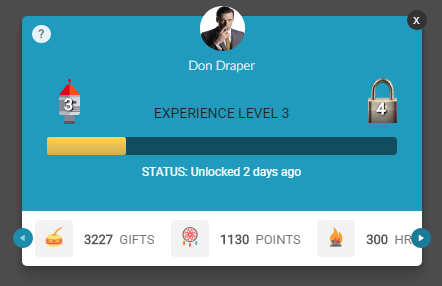 The profile summary that appears when hovering over the username
Implementation
To render the Header Widget, add a call to the Mambo header() function in the mamboCallbacks() array. The example below shows the function call with all available options. None of these options are required, so you could simply use: Mambo('.selector').header().
Note that the header will use the maximum width of the HTML element it's attached to. To make the containing HTML element fit the width properly, set its position to absolute.
Configuration options
Each option found in the code above is explained in detail below. None of these options are required.
| Option | Description | Default Value | Sample Value |
|---|---|---|---|
| hideOnError | Hides the widget if there is an error retrieving the user's data from the server. When set to true, the widget will only be shown after successfully retrieving user data, meaning no "Loading..." message will be displayed during data fetching. | false | true |
| userName | Determines which value should be displayed as the user's name. Supports four settings: displayName, firstName, lastName and fullName. The fullName option will render the firstName concatenated with the lastName. | fullName | displayName |
| picClass | Overrides the default icon used when broken images are identified. | mambo-sprite mambo-silhouette-lg | my-picture-icon |
| hasEarnPoints | Controls whether the "How do I earn Points?" link is displayed. It is highly recommended to leave this option enabled. | true | false |
| earnPointsUrl | Provides an alternative behaviour for the "How do I earn Points?" link. By default, this link opens a popup window showing all available behaviours the user can perform. If earnPointsUrl is set, the link will instead open the specified URL. | N/A | http://site.com/user |
| pointOpts.show | Determines whether points should be displayed in the header. | true | false |
| pointOpts.abbr | Controls whether points should be displayed using abbreviated units of measure. When false, the full unit of measure is used. | true | false |
| pointOpts.exclude | Specifies which points should not be displayed. Takes an array of point IDs, which can be found in the Administration Panel when editing a specific point. | null | ['pointId'] |
| pointOpts.include | Specifies which points should be displayed. Takes an array of point IDs, which can be found in the Administration Panel when editing a specific point. When both include and exclude are specified, the include list takes precedence. | null | ['pointId'] |
User data options
Where the user has no name at all, the header shows the Anonymous label. Supply your own name and picture with these options, or with the users options if every widget on the page should draw on the same source.
| Option | Description | Default Value | Sample Value |
|---|---|---|---|
| userData | A map of uuid to user details, used to show a name and picture you hold rather than the ones Mambo holds. To fetch them instead, configure a resolver on the users options. | null | {'0001': {firstName: 'Ana'}} |