Activities widget
The Activities Widget renders activity streams on the page. These streams can be customised in multiple ways:
- By specific user
- With reward activities only
- With behaviour activities only
- By tags or tagUuid
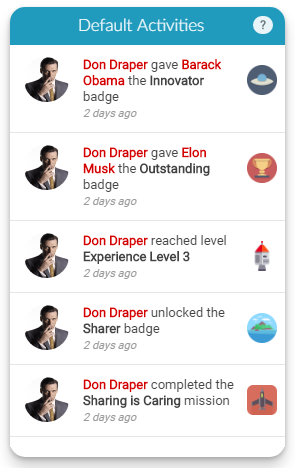 The Activities Widget displaying a stream of user activities with timestamps
Implementation
To render the Activities Widget, add a call to the Mambo activities() function in the mamboCallbacks() array. The example below shows all available options. None of these options are required, so you could simply use: Mambo('.selector').activities().
Configuration options
Each option is explained in detail below. None of these options are required.
Display options
| Option | Description | Default Value | Sample Value |
|---|---|---|---|
| height | Sets the height of the activities element in pixels. | 500 | 400 |
| title | Overrides the default title of the widget. | N/A | My Rewards |
| picClass | Overrides the default icon used when broken profile images are identified. | mambo-sprite mambo-silhouette-lg | my-picture-icon |
| count | Determines the number of activities to retrieve. | 30 | 35 |
Points information
| Option | Description | Default Value | Sample Value |
|---|---|---|---|
| hasEarnPoints | Determines whether the "How do I earn Points?" link is displayed. Recommended to leave enabled. | true | false |
| earnPointsUrl | Provides an alternative behaviour for the "How do I earn Points?" link. By default, this opens a popup with available behaviours. If set, the link will open the specified URL instead. | N/A | http://mydomain.com/profile/user |
Tag filtering
| Option | Description | Default Value | Sample Value |
|---|---|---|---|
| tags | Filters activities by one or more tags. For more details, refer to the Tag APIs. | N/A | ['tagA','tagB'] |
| tagUuid | Filters activities by a specific user's tags. For more details, refer to the Tag APIs. | N/A | uniqueUserId |
Content filtering options
| Option | Description | Default Value | Sample Value |
|---|---|---|---|
| filterOpts.withBehaviours | Determines whether behaviour activities should be shown in the stream. | true | false |
| filterOpts.withRewards | Determines whether reward activities should be shown in the stream. | true | false |
| filterOpts.withActivities | Determines whether point, gift and bounty activities should be shown in the stream. | true | false |
| filterOpts.withPointActivity | Determines whether point activities should be shown in the stream. | false | true |
| filterOpts.withContentOnly | Shows only behaviours with associated content in the stream. When false (default), all behaviours are shown, with behaviour names displayed for those without content. | false | true |
| filterOpts.withUuid | Loads activities for a specific user. | N/A | john@doe.com |
| filterOpts.hideBehaviours | Hides specific behaviours in the widget by behaviour ID. Useful for excluding simple behaviours. | N/A | ['behaviour_id'] |
| filterOpts.hideRewards | Hides specific rewards in the widget by reward ID. | N/A | ['reward_id'] |
User data options
An activity whose user has no name is still shown, with the user named under the Anonymous label. Supply your own names and pictures with these options, or with the users options if every widget on the page should draw on the same source.
| Option | Description | Default Value | Sample Value |
|---|---|---|---|
| userResolver | Function supplying the details of the users the activities mention. An activity names whoever received a gift or a bounty as well as whoever caused it. | null | function(uuids, ctx) { ... } |
| userData | A map of uuid to user details, used in place of a resolver when the data is already on the page. | null | {'0001': {firstName: 'Ana'}} |