Gift widget
The Gift Widget allows users to give each other gifts in the form of badges and/or points. Using this widget, one user can give another any of the Gifts or Giftable Points configured in the Administration Panel.
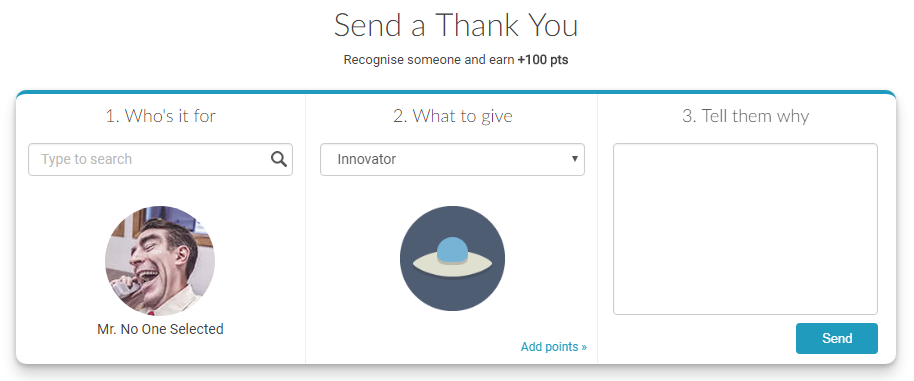 The Gift Widget interface allowing users to select recipients, gift types, and add personalized messages
Implementation
To render the Gift Widget, add a call to the Mambo gift() function in the mamboCallbacks() array. The example below shows the function call with all available options. None of these options are required, so you could simply use: Mambo('.selector').gift().
Configuration options
Each option found in the code above is explained in detail below. None of these options are required.
Display options
| Option | Description | Default Value | Sample Value |
|---|---|---|---|
| popup | When enabled, displays the widget in a popup in the middle of the screen. When using this option, a class selector is not required. | false | true |
| title | Allows you to override the default title displayed in the widget. | null | Send a Gift |
| prize | Adds a prize message under the widget title. This can be used to describe an activity triggered by the triggerActivity option, providing users with additional incentive to give gifts. | null | Win 600 points |
Gift content options
| Option | Description | Default Value | Sample Value |
|---|---|---|---|
| withPoints | Enables or disables the option to give points through the widget. | true | false |
| withGifts | Enables or disables the option to give Gift rewards through the widget. | true | false |
| requireReason | Determines whether the reason field ("Tell them why") is mandatory when sending a gift. | true | false |
User filtering options
| Option | Description | Default Value | Sample Value |
|---|---|---|---|
| tags | Specifies tags that users must have in order to appear in the search results. This allows you to focus gifting on particular subsets of users, such as members of a specific department or office location. | null | ['finance_dept','hr_dept'] |
| tagsJoin | Determines whether users must have all specified tags (hasAllOf) or any of the specified tags (hasAnyOf) to appear in search results. | hasAnyOf | hasAllOf |
Activity triggers
| Option | Description | Default Value | Sample Value |
|---|---|---|---|
| triggerActivity | Defines an activity that will be triggered for the user who performs the gifting. This allows you to reward the sender with any type of activity (behaviour, point, coupon, etc). See Create activities for sample data objects. | null | See activities documentation |
User data options
A user with no name is still listed as someone you can give a gift to, under the Anonymous label. Supply your own names and pictures with these options, or with the users options if every widget on the page should draw on the same source.
| Option | Description | Default Value | Sample Value |
|---|---|---|---|
| userSearch | Function searching your own users, in place of Mambo's search. Mambo matches on the names it holds, so a site which has not shared them finds nobody and cannot give a gift at all. | null | function(query, ctx) { ... } |
| userResolver | Function supplying the details of the users the search found. | null | function(uuids, ctx) { ... } |
| userData | A map of uuid to user details, used in place of a resolver when the data is already on the page. | null | {'0001': {firstName: 'Ana'}} |
Searching your own users
Return whatever users match the query, each carrying at least a uuid. The gift is sent to the uuid, so you are free to name them however you like.
The message naming who gave you a gift keeps a record of the giver taken at the moment of the gift, and that record does not carry the uuid your resolver and search are keyed on. A gift from a user who has no name in Mambo therefore shows as Anonymous, and cannot presently be corrected by supplying your own data.